Which basement gaming room format fits your space?
Every basement gaming room is one of three formats or a mix of them: a console lounge built around one big screen and a couch, a PC battle station built around a desk and a chair, or an arcade corner built around cabinets that stand against a wall. Pick the primary one first, because it decides where the screen goes, and the screen decides where everything else goes.
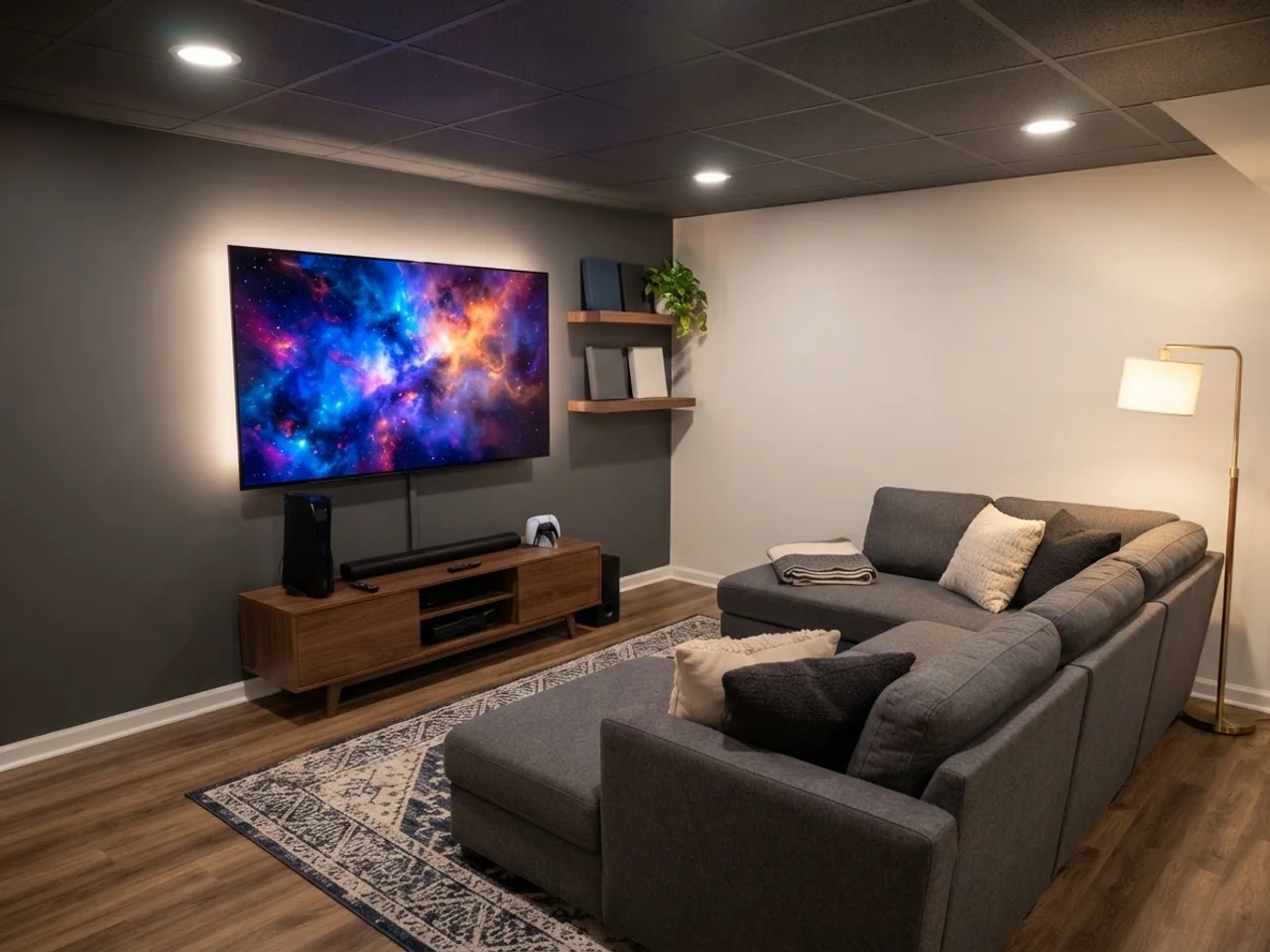
The console lounge is the easiest fit. A 75 or 85 inch TV on the long wall, a sectional 8 to 9 feet away, a low console table for the hardware, and shelving on one side. It needs roughly 12 by 14 feet to feel like a room instead of a corner, and it works under a 7 foot ceiling because nothing is mounted high.
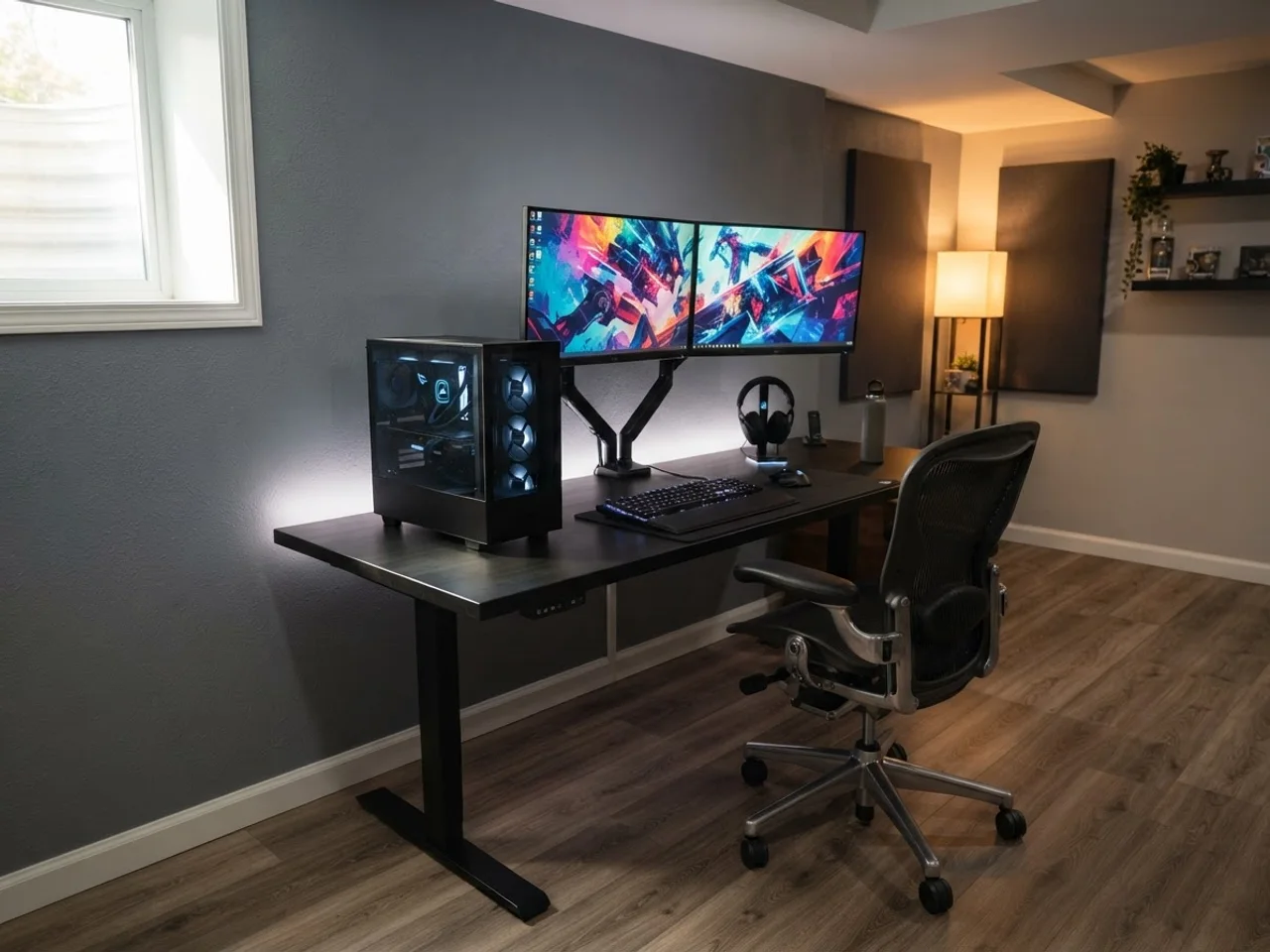
The PC battle station is a desk problem, not a room problem. A 60 inch desk with two 27 inch monitors, a tower on the floor or a stand, and a chair that rolls need a 7 by 8 foot footprint minimum, 8 by 10 if you want the desk off the wall. Put the desk perpendicular to any window well so daylight does not land on the panels.
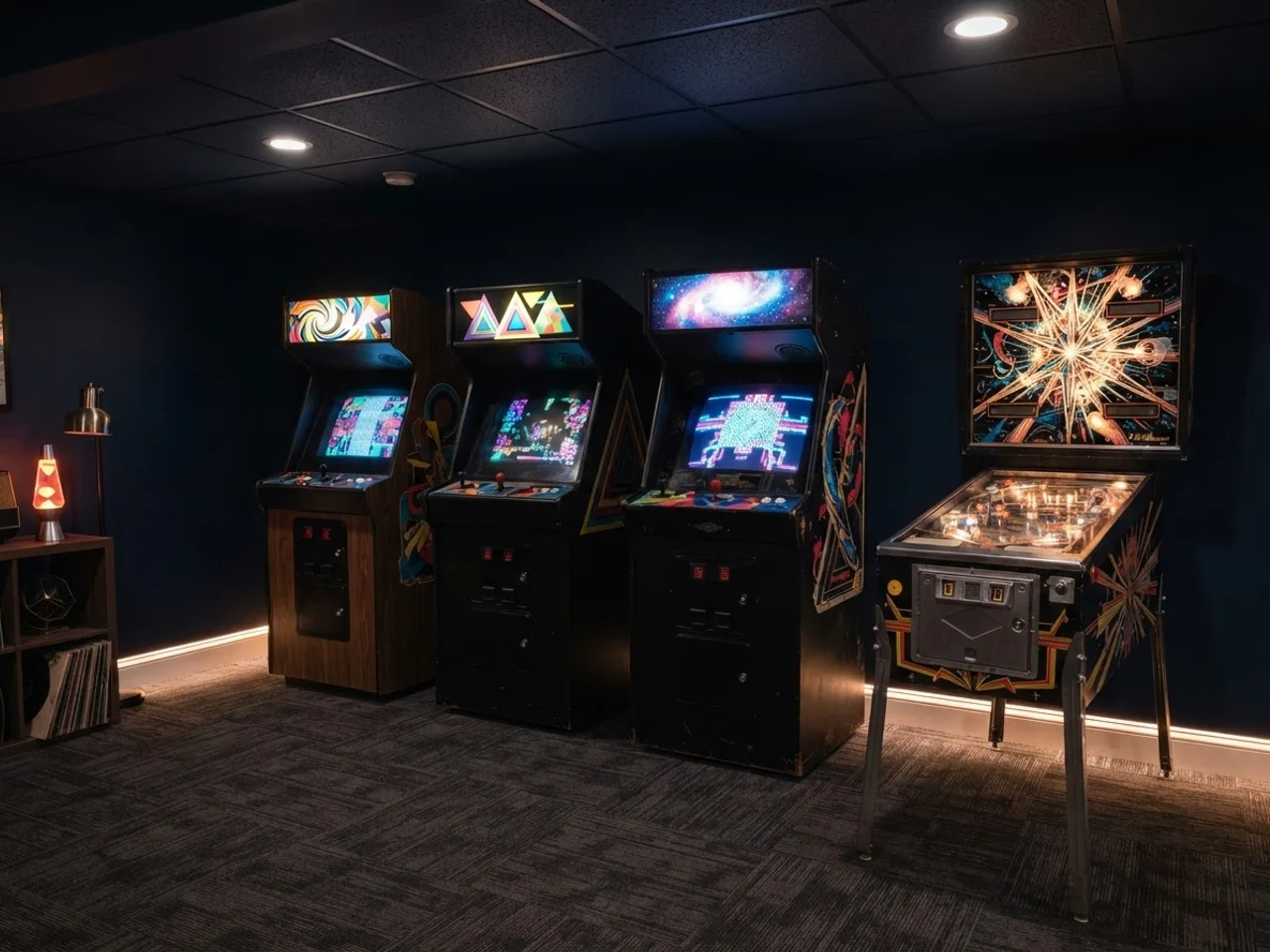
The arcade corner is the one people underestimate. Three upright cabinets and a pinball machine take 12 linear feet of wall plus 3 feet of standing room in front, so plan on a 14 by 8 foot strip. Full-size cabinets are 6 feet tall; check the ceiling height under ducts and beams, because a 72 inch cabinet under a 78 inch soffit leaves no room to tilt it into place.
| Format | Minimum footprint | Comfortable footprint | Anchor piece |
|---|---|---|---|
| Console lounge | 10 × 12 ft | 12 × 14 ft | 75 to 85 in TV plus sectional |
| PC battle station | 7 × 8 ft | 8 × 10 ft | 60 in desk, two monitors |
| Arcade corner (3 cabinets + pinball) | 12 × 6 ft | 14 × 8 ft | Cabinets along one wall |
| Racing or flight rig | 5 × 7 ft | 6 × 8 ft | Cockpit plus triple screens |
| All three combined | 16 × 20 ft | 18 × 24 ft | Screen wall, desk, cabinet wall |
How far should you sit from the screen?
Console gaming wants a closer seat than movies. The cinema rule (a 36 degree viewing angle) puts a 75 inch TV at about 8.5 feet; for competitive play most people sit closer, around 6.5 to 7 feet for a 75, because you are reading a minimap, not watching a landscape. Sitting too far is the more common mistake in a basement, since the room is big and the couch drifts to the back wall.
For a PC station the numbers are fixed by the desk: 27 inch 1440p monitors sit 24 to 30 inches from your eyes, a 32 inch 4K monitor 28 to 34 inches, and a 34 inch ultrawide about 30 inches. That means the desk needs at least 28 inches of depth, and 30 is better if the monitor arm clamps to the back edge.
Projectors are tempting in a dark basement, but at 120 inches you need 12 feet to the seat and a room that stays dark, and input lag on most home projectors runs 20 to 50 ms, which competitive players notice. A 98 inch TV at $2,500 to $4,000 in 2026 is the better gaming choice if the wall and the stairs fit it.
| Screen | Seat, immersive | Seat, competitive | Notes |
|---|---|---|---|
| 55 in TV | 6 ft | 5 ft | Small for a lounge, fine as a second screen |
| 65 in TV | 7.5 ft | 6 ft | Feels small on a 14 ft wall |
| 75 in TV | 8.5 ft | 6.5 to 7 ft | The basement sweet spot in 2026 |
| 85 in TV | 9.5 ft | 7.5 to 8 ft | Needs a 12 ft room to sit right |
| 98 in TV | 11 ft | 9 ft | Check the doorway and stairs before ordering |
| 120 in projector | 12 to 13 ft | Not recommended | Lag and light control |
How do you wire and network a basement gaming room?
Basements are usually the easiest room in the house to wire, because the ceiling is open or a drop ceiling, and the panel is often in the same room. Use that. A gaming room running on the two outlets that came with the unfinished space ends up with power strips daisy-chained across the floor.
Plan outlets per station, not per wall. A console lounge wants a quad outlet behind the TV (TV, console, soundbar, streaming box) plus a second quad behind the couch for chargers and a lamp. A PC station wants its own 20 amp circuit with a quad outlet at desk height: a high-end PC and two monitors draw 600 to 900 watts under load, and sharing that with a dehumidifier trips breakers. An arcade corner wants one outlet per cabinet, on the wall behind them at 12 inches off the floor, and pinball machines want their own circuit if you have more than two.
Run ethernet to every station. Wi-Fi through a concrete floor and a steel-framed drop ceiling is where your ping goes to die; a Cat6 run to the TV wall, the desk and the router location costs $100 to $300 in cable and jacks if the ceiling is open. Put a small 8-port switch at the TV wall for the console, TV and streaming box. If the walls are getting drywalled, add 1 inch conduit from the TV wall to the equipment shelf, so the HDMI cable you need in 2030 can be pulled without opening the wall.
- Console lounge: two quad outlets, one ethernet drop at the TV, HDMI conduit from the TV to the console shelf.
- PC station: dedicated 20 A circuit, quad outlet at desk height, one ethernet drop, one more outlet for the monitor-arm strip.
- Arcade corner: one outlet per cabinet, a 20 A circuit per four cabinets; pinball machines draw 200 to 300 W each in play.
- Everything: a whole-house surge protector at the panel ($150 to $300 installed) beats a dozen power strips.
How do you light it and keep the noise downstairs?
The rule is: light the room, not the screen. Bias lighting is a strip of neutral white LED (6500K, matched to the screen's white point) behind the TV or monitors; it raises the ambient light around the screen so your pupils stop hunting and blacks look deeper. A $20 to $40 strip is the highest-value purchase in this entire guide.
RGB is fine when it does one thing. A single accent: an LED strip in a cove over the screen wall, a lit shelf behind the desk, or the glow of the cabinet marquees. Pick one color family and dim it to 20 or 30 percent; a room with six rainbow strips, an RGB chair and RGB fans reads like a phone store. Bulbs that sync to the game are worth it on the console wall and nowhere else. Ceiling light goes on a dimmer and off the screen axis: recessed cans over the couch reflect in a glossy TV, so put them behind the seating line or wash the side walls instead. Paint the screen wall mid gray or charcoal, never white.
Sound is the neighbor problem. A subwoofer on a slab is loud upstairs because the concrete carries it into the framing; an isolation platform ($60 to $150) cuts that by half. For the rest, the ceiling is the path: acoustic drop-ceiling tiles do little for bass, but rockwool between the joists plus resilient channel and 5/8 inch drywall cut voices and mid-range sharply, at $3 to $6 per square foot. Late-night sessions in a shared house are a headphones problem, and a good open-back pair with a DAC is $150 to $400 against $5,000 to treat a ceiling. A solid-core door with a sweep ($200 to $400) leaks less than a hollow one, which leaks more than the ceiling.
Arcade cabinets and pinball are quieter than people fear (a flipper is a mechanical clack, not bass), but the room they sit in echoes. Carpet tiles under the standing zone and one or two acoustic panels on the facing wall are enough.
How much space do arcade cabinets, pinball and rigs take?
These are the footprints to plan around. Width matters for the wall, depth matters for the standing room in front (add 30 to 36 inches for the player), and height matters for ducts and stairs.
| Machine | Footprint (W × D) | Height | Weight | Notes |
|---|---|---|---|---|
| 3/4-scale upright (Arcade1Up type) | 19 × 23 in | 58 in, 70 with riser | 60 to 80 lb | Two per 40 in of wall |
| Full-size upright cabinet | 26 × 34 in | 72 in | 250 to 350 lb | Needs a 32 in door and two people |
| Cocktail table cabinet | 32 × 24 in | 30 in | 150 lb | Sit-down, doubles as a side table |
| Pinball machine | 29 × 55 in | 76 in with backbox up | 250 to 300 lb | Add 24 in behind to fold the backbox |
| Virtual pinball cabinet | 30 × 60 in | 72 in | 250 lb | Same slot as a real pinball |
| Racing rig with triple monitors | 30 × 60 in plus screens | 48 in | 100 to 200 lb | Total zone 6 × 8 ft |
| Sit-down driving cabinet | 36 × 72 in | 70 in | 300 lb | Widest single item on the list |
| Air hockey table, 7 ft | 48 × 84 in | 32 in | 200 lb | Plus 36 in at both short ends |
What does a basement gaming room cost in 2026?
Finishing the room itself runs the same $30 to $60 per square foot as any basement room; the finishing cost page has the line items. The numbers below are the gaming layer on top of a room that already has floors, walls and outlets.
| Format | Budget | Mid | High | What the money buys |
|---|---|---|---|---|
| Console corner | $1,500 | $4,000 | $8,000 | 65 to 85 in TV, console, soundbar or 5.1, sectional, bias light, shelf |
| PC battle station | $2,000 | $5,000 | $10,000 | Desk, chair, PC, two monitors, arm, peripherals, dedicated circuit |
| Arcade corner | $2,500 | $8,000 | $15,000+ | Three 3/4-scale cabinets and a used pinball at the low end; full-size cabinets and a new pinball at the top |
| Racing or flight rig | $1,500 | $4,000 | $9,000 | Cockpit, wheel or stick, triple monitors or ultrawide; PC not included |
| Lighting, wiring, sound | $300 | $1,500 | $4,000 | Strips and a dimmer at the low end; ceiling insulation, conduit and circuits at the top |
| All-in gaming basement | $5,000 | $15,000 | $35,000 | All three formats plus finishing a 300 sq ft room |